
A new Drupal vulnerability, CVE-2026-136716, lets attackers take over sites through the core installer, and Drupal says it is already being exploited. It landed on November 25, 2026, exactly one week after the “Fail2Install” installer fix, and the uncomfortable part is this: sites that installed last week’s patch can still be wide open.
The Drupal Security Team published it as SA-CORE-2026-019, rated Highly critical (21 out of 25). The trigger is the same file as last time, core/install.php, on sites that ended up in an unusual or incomplete install state. Nothing in the admin UI tells you whether your site is in that state, which is why every Drupal admin should treat this one as a “check today” job rather than a “next maintenance window” job.
| Advisory / CVE | SA-CORE-2026-019 / CVE-2026-136716 |
| Affected product | Drupal core (install.php), all branches before the fixed releases |
| Fixed versions | 10.6.23, 11.3.23, 11.4.14 |
| Severity | Highly critical, 21/25 (Drupal risk score); NVD CVSS not yet assessed as of Nov 26, 2026 |
| Exploited in the wild | Yes, per the Drupal Security Team |
| CISA KEV | Not listed as of Nov 26, 2026 (the earlier CVE-2026-132165 was added Nov 24) |
| Workaround | Yes: block access to core/install.php |
| Published | November 25, 2026 |
TL;DR: If /core/install.php was reachable on your site at any point since November 18, 2026:
- Block the installer in Nginx or Apache right now. It takes minutes.
- Check user 1, admin accounts and the install state before running database updates.
- Update to Drupal 10.6.23, 11.3.23 or 11.4.14, then run
drush updatedb. - If anything looks off, restore from a pre-November 18 backup and rotate secrets. Updating does not clean a hacked site.
What happened: a second Drupal installer flaw in a week
This is a sequel. On November 18, Drupal released SA-CORE-2026-017 for CVE-2026-132165, a remote code execution bug in the installer that lets an attacker try to reinstall Drupal on top of a live site. Drupal credits Anthropic’s OSS scanner with finding that one, and attacks on live sites were reported from November 19. A week later, the team found that the fix didn’t cover every case.
| Date | Event |
|---|---|
| Nov 18, 2026 | SA-CORE-2026-017 (CVE-2026-132165, “Fail2Install”) fixed in 10.6.22, 11.3.22 and 11.4.13 |
| Nov 19, 2026 | Drupal receives reports of SA-CORE-2026-017 being exploited on live sites (from 19:00 UTC) |
| Nov 24, 2026 | CISA adds CVE-2026-132165 to the KEV catalog, with a federal due date of Nov 27 |
| Nov 25, 2026 | SA-CORE-2026-019 (CVE-2026-136716) released; exploitation in the wild confirmed |
| Nov 26, 2026 | Drupal publishes a step-by-step guide for checking whether a site was compromised through the installer |
If you patched to 10.6.22, 11.3.22 or 11.4.13 last week and moved on, you are not covered. Drupal states that plainly in its new guidance.
Why the first patch wasn’t enough
Drupal’s installer is meant to run once. After that, install.php should see that the site is installed and refuse to do anything useful. Both bugs come down to the installer making the wrong call about that.
The November 18 fix tightened those checks. What it missed were sites sitting in an “unusual or incomplete install state”. NVD files CVE-2026-136716 under CWE-754, an improper check for unusual or exceptional conditions, which fits: the code handled the normal path, not the odd one. In practice this can be a production site that has run normally for years, while its database still records the installer as unfinished. On those sites, someone who can reach install.php can drive the final installer steps again and take over the site, including the user 1 (super admin) account.
Two details make this nasty. First, the vulnerable state is invisible in the admin interface. Second, a site that has already been hit may no longer look vulnerable, because a successful attack can complete the install state it abused. So “my site looks fine now” proves very little.
My take: the installer has no business being reachable on a production site, and this week proves it. Patching fixes this specific bug; blocking the installer removes the whole class of bug. Do both.
Am I affected by CVE-2026-136716?
Run through this list. Any single tick means you have work to do today.
Tick everything that applies to you
Any box ticked? Patch now. Ticks reset when you reload the page.
Check your Drupal core version
drush status --field=drupal-version
# or, for Composer-managed sites
composer show drupal/core | grep -i versions
Check whether the installer is reachable (replace example.com)
curl -I https://example.com/core/install.php
curl -IL https://example.com/install.php
curl -I https://example.com/core/install.php/foo
All three should end in 403 or 404. A 200 means the installer can be reached. On an installed site it usually just shows an “already installed” page, but that is the door attackers knock on.
| Branch | Fixed version |
|---|---|
| Drupal 11.4.x | 11.4.14 |
| Drupal 11.3.x | 11.3.23 |
| Drupal 11.0.x to 11.2.x | No fix, end-of-life: upgrade to 11.3 or 11.4 |
| Drupal 10.6.x | 10.6.23 |
| Drupal 10.5.x and older, Drupal 8 and 9 | No fix, end-of-life: upgrade, and block the installer now |
Disclaimer: These steps are general guidance based on the vendor’s published advisory and are provided as-is. Every environment is different: test in a staging environment, take a full backup or snapshot first, and follow the vendor’s official documentation. SysOpsTechnix accepts no responsibility for outages, data loss or other damage resulting from applying these steps. See our Terms of Use.
How to fix the Drupal vulnerability: block, check, update
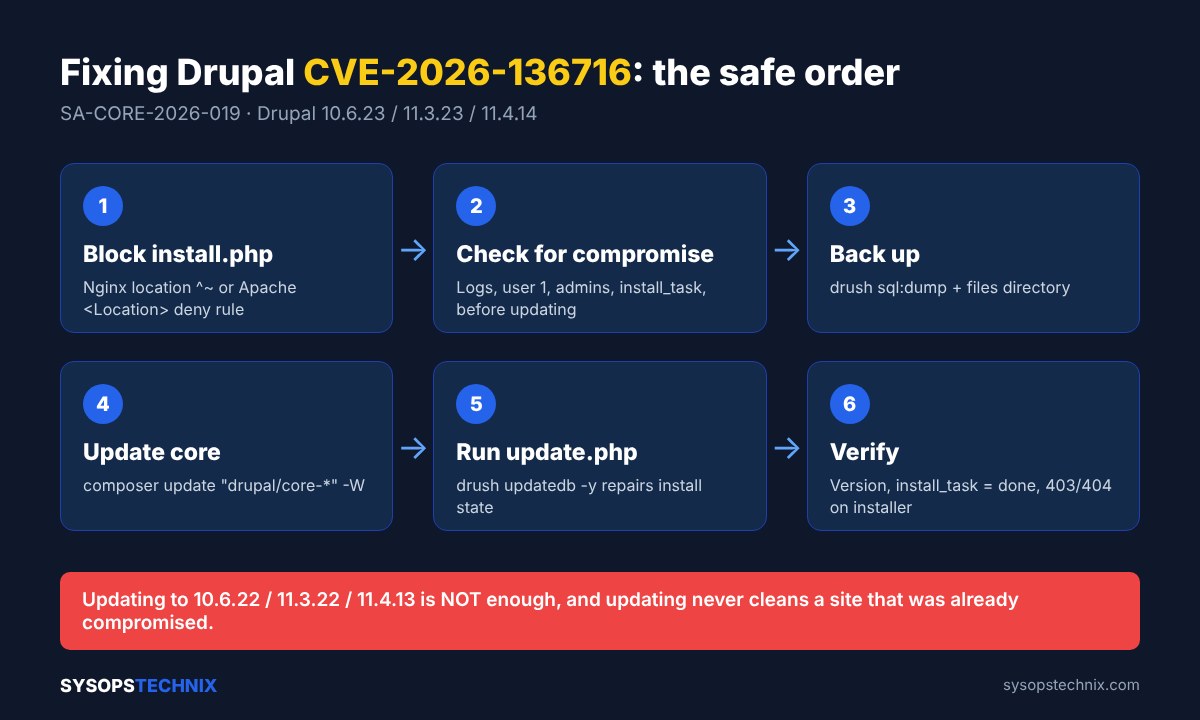
Order matters here. Drupal’s own guidance is to block the installer first, run the compromise checks before database updates (the update changes some of the values you want to inspect), and only then update core.
Step 1: Block install.php in your web server
This is the fastest way to close the hole, and Drupal recommends it on every site whether or not you are patched. For Nginx, add this inside the HTTPS server block. The ^~ prefix match also catches paths like /core/install.php/foo, which an exact match can miss on configs that pass .php/ paths to PHP.
Nginx
location ^~ /core/install.php {
    return 404;
}
sudo nginx -t && sudo systemctl reload nginx
For Apache, put this in the virtual host config (not .htaccess, where a Location block causes a 500 error). Cover every vhost that serves the site, including the HTTPS one Certbot may have created separately.
Apache
<Location "/core/install.php">
    Require all denied
</Location>
sudo apachectl configtest && sudo systemctl reload apache2
On shared hosting where you can’t touch the server config, a <Files "install.php"> rule in .htaccess works, but Composer’s scaffold step overwrites that file. Drupal’s Securing the installer page shows how to append your rule through drupal-scaffold so it survives. Don’t block update.php by accident; it’s a separate script and you need it in step 4.
Step 2: Look for signs of compromise first
Do the checks in the signs of compromise section below now, before any database update. If something looks wrong, stop and handle it as an incident.
Step 3: Take a backup
drush sql:dump --gzip --result-file=../backups/pre-sa-core-2026-019.sql
tar -czf ../backups/files-pre-sa-core-2026-019.tar.gz web/sites/default/files
Keep any older backups from before November 18 safe too. If you find evidence of compromise later, those are the ones you’ll want.
Step 4: Update Drupal core with Composer and run update.php
Most modern sites use the drupal/core-recommended template. From the project root:
composer update "drupal/core-*" --with-all-dependencies
drush updatedb -y
drush cache:rebuild
The database update is not optional this time. Drupal ships an update hook that repairs the recorded install state on existing sites, so the code alone leaves the site in an odd state even though the hole is closed. If you deploy through CI, make sure your pipeline runs drush deploy or drush updatedb after the code goes out.
Still on a tarball install? Replace the core directory and the top-level files with the ones from the new release, keep your sites folder, then visit /update.php as an admin. On an end-of-life branch, there is no patched release for you: keep the installer blocked and plan the upgrade to 10.6 or 11.3/11.4 now.
Step 5: Verify
drush status --field=drupal-version   # expect 10.6.23, 11.3.23 or 11.4.14
drush state:get install_task          # expect: done
curl -I https://example.com/core/install.php   # expect 403 or 404
Finish with a quick smoke test of the site and confirm you can still log in as an admin. If you lock down the installer with a server rule, also keep it in your config management so a server migration doesn’t silently drop it. Our pre-launch checklist for Linux web servers covers the same kind of hardening for new builds.
Can’t update Drupal core today? Temporary mitigations
Blocking install.php is the mitigation, and a good one. Drupal says it closes this vulnerability faster than updating. If you can only do one thing in the next hour, do step 1.
Sites behind Drupal Steward (the web application firewall program run with the Drupal Security Team) are protected against the known attack paths for both SA-CORE-2026-017 and SA-CORE-2026-019, per the advisory. Drupal still asks those sites to update soon, in case new attack paths turn up. A third option is deleting core/install.php after each Composer run, using post-install-cmd and post-update-cmd scripts. It works, but composer install --no-scripts puts the file back, so pair it with a web server rule instead of relying on it alone.
Whatever you do, don’t treat a WAF rule or a deleted file as a reason to skip the update. They cover the known attack, not the next variation.
Signs of compromise: was your Drupal site hacked through the installer?
Drupal’s compromise-check guide goes deeper, but these are the checks that matter most. Run them from the project root, before drush updatedb.
1. Installer requests in your access logs since November 17 (adjust the log path)
zgrep -hE '"(GET|POST) /core/install\.php' /var/log/nginx/access.log* \
  | awk '{gsub(/"/,"",$6); print $6, $9, $10}' | sort | uniq -c | sort -rn
Background noise is normal; bots probe install.php all the time. A 403/404 is fine, and a 200 of about 2 KB is usually the “already installed” page. Investigate POST requests that got a 302 or 303, much larger responses, requests carrying op= or id=, and bursts from one IP. Also look for hits on PHP files under sites/*/files/, a classic backdoor sign.
2. The user 1 account
drush user:information --uid=1
drush sql:query "SELECT uid, name, mail, FROM_UNIXTIME(created), FROM_UNIXTIME(changed) FROM users_field_data WHERE uid = 1"
An email address you don’t own, or a recent “changed” date nobody can explain, is a red flag. The attack replays the final installer steps, which can swap user 1’s username, email, password and timezone. If the user 1 password suddenly doesn’t work, assume the worst.
3. Administrator accounts, install time and install state
drush sql:query "SELECT u.uid, u.name, u.mail, FROM_UNIXTIME(u.created) FROM users_field_data u JOIN user__roles r ON r.entity_id = u.uid WHERE r.roles_target_id = 'administrator'"
drush php-eval "var_dump(date('Y-m-d\TH:i:s', (int) \Drupal::state()->get('install_time')))"
drush state:get install_task
An install time from this week on a site that’s years old is suspicious, unless it lines up with your own database update. A 1970 date just means no value is stored, which isn’t proof of an attack on its own, but combined with an install_task that isn’t done it means the site is vulnerable right now.
4. Unexpected PHP files and settings.php changes
find web/sites/*/files -name '*.php' -newermt 2026-11-17
ls -l --time-style=full-iso web/sites/default/settings.php
If anything looks wrong, treat it as an incident. Updating does not remove accounts, files or settings an attacker added. Take the site offline or put it behind maintenance mode, preserve the logs (some hosts keep them only for days), restore from a backup taken before the earliest suspicious request, then update and block the installer before bringing it back. Rotate the database password, the hash_salt in settings.php, and any API keys or SMTP credentials stored in the site.
If the same server also runs other PHP apps, last week’s nginx2root and PHP vulnerabilities guide is worth a look while you’re in there.
Drupal security update FAQ
What is CVE-2026-136716?
It’s an access bypass in the Drupal core installer, published as SA-CORE-2026-019 on November 25, 2026. On sites in an unusual or incomplete install state, an attacker who can reach core/install.php can take over the site. Drupal rates it Highly critical and has confirmed exploitation in the wild.
I updated to Drupal 11.4.13 last week. Am I safe?
No. 10.6.22, 11.3.22 and 11.4.13 fixed CVE-2026-132165 but not this follow-up. You need 10.6.23, 11.3.23 or 11.4.14, plus the database update.
Will blocking install.php break Drupal updates?
No. Database updates go through update.php or drush updatedb, which are separate. You only need install.php to install a new site in the browser, and drush site:install doesn’t use it at all.
Is CVE-2026-136716 in the CISA KEV catalog?
Not as of November 26, 2026. The earlier installer bug, CVE-2026-132165, was added on November 24. Given confirmed exploitation, it wouldn’t be surprising to see this one follow, and we’ll update this post if it does.
I’m still on Drupal 9 or Drupal 10.5. What should I do?
Those branches get no security fixes. Block the installer today, run the compromise checks, and schedule the upgrade to a supported branch (10.6, 11.3 or 11.4). Running an end-of-life CMS on the public internet during an active exploitation wave is a gamble you don’t need.
How do I know if my Drupal site was hacked?
Start with installer POSTs in your access logs, the user 1 email and changed date, unknown administrator accounts, and the recorded install time. The signs of compromise section above has the commands. For more Security News like this, see our recent coverage of the vCenter authentication bypass CVE-2026-123903.
Sources
- Drupal Security Advisory SA-CORE-2026-019 (Nov 25, 2026)
- Drupal Security Advisory SA-CORE-2026-017 (Nov 18, 2026)
- Drupal.org: Checking whether your site was compromised through the installer
- Drupal.org: Securing the installer (install.php)
- NVD: CVE-2026-136716
- CISA Known Exploited Vulnerabilities catalog
- The Hacker News: Drupal Warns of New Highly Critical Site Takeover Vulnerability