
Another week, another vCenter authentication bypass. On November 24, 2026, Broadcom published VMSA-2026-0011, and its headline bug, CVE-2026-123903, is a critical (CVSS 9.8) flaw in the VMware Directory Service that lets anyone with network access to vCenter skip the login and walk in. It arrived five days after CVE-2026-123890, a different bypass in the same service that a China-nexus espionage group had been quietly exploiting since September. We covered that one in our CVE-2026-123890 zero-day patch guide.
There is some relief in the fine print. Broadcom hasn’t reported any exploitation of the new bug, and if you already moved vCenter 8.0 to U3m last week, that same build covers CVE-2026-123903. Teams on vCenter 9.0 or 9.1 (VCF 9 and vSphere Foundation 9) aren’t so lucky: last week’s builds aren’t enough, so you’re patching again. And since the same advisory carries two 9.8-rated ESX bugs, most shops have a host patching cycle coming too.
| CVE / advisory | CVE-2026-123903 (plus CVE-2026-123904 to CVE-2026-123909 for vCenter), Broadcom VMSA-2026-0011 |
| Affected | vCenter 7.0, 8.0, 9.0 and 9.1, including VMware Cloud Foundation, vSphere Foundation and Telco Cloud Platform / Infrastructure |
| Fixed versions | vCenter 8.0 U3m, 9.0.2.0300, 9.1.2; VCF 5.x: 5.2.5 (async patch, KB 88287); Telco Cloud: KB463501 |
| Severity | CVSS 9.8, Critical |
| Exploited in the wild | No known exploitation as of November 25, 2026 |
| CISA KEV | Not listed as of November 25, 2026 |
| Workaround | None |
| Published | November 24, 2026 |
TL;DR: what to do this week
- vCenter 8.0 already on U3m? You’re covered for CVE-2026-123903. Anything older: update to 8.0 U3m now.
- vCenter 9.0 or 9.1: move to 9.0.2.0300 or 9.1.2, even if you patched for CVE-2026-123890 last week.
- VCF 5.x: apply vCenter 8.0 U3m (and ESX 8.0 U3m) through the asynchronous patching process in KB 88287.
- Limit vCenter’s management ports (443, 2012, 5480, 22) to admin networks only.
- Schedule ESX updates as well: CVE-2026-123910 and CVE-2026-123911 are network-reachable 9.8 host bugs.
What happened
vmdir has had a rough few months. Here’s the sequence, pulled from Broadcom’s advisories, CISA and Google Threat Intelligence:
| Date | Event |
|---|---|
| July 29, 2026 | Broadcom discloses CVE-2026-59309, an earlier vmdir authentication bypass over the LDAP ports (per Google’s write-up). |
| Early September 2026 | Google says the group it tracks as ARMORY CASTLE starts exploiting CVE-2026-123890 as a zero-day. |
| November 19, 2026 | Broadcom ships VMSA-2026-0009 with the CVE-2026-123890 fix; Google publishes its research the same day. |
| November 20, 2026 | CISA adds CVE-2026-123890 to the KEV catalog, with a federal deadline of November 23. |
| November 24, 2026 | Broadcom publishes VMSA-2026-0011: 23 CVEs across vCenter, ESX, Workstation, Fusion, VMware Tools and Avi Load Balancer, led by CVE-2026-123903. |
Three separate teams reported CVE-2026-123903 independently: mochazz of sglab at Qianxin, Qi Qin of depthfirst, and VulTeam and XGTP from ThreatBook. Broadcom’s Q&A is explicit that this is “a new and distinct issue” from CVE-2026-123890, not a bypass of last week’s fix. Still, when three groups find the same hole in the same service within weeks of a zero-day there, you should assume plenty of other people are digging through vmdir right now, and not all of them will report what they find.
What the vCenter authentication bypass actually does
The VMware Directory Service (vmdir) is the directory that sits behind vCenter Single Sign-On. It holds the vsphere.local domain: users, groups, solution accounts and the material vCenter uses to issue and trust login tokens. If you can get past authentication there, you don’t need anyone’s password for the rest of vCenter.
Broadcom’s description is short: a malicious actor with network access to vCenter may bypass authentication and gain unauthorized access. The CVSS vector it published (AV:N/AC:L/PR:N/UI:N) means network-reachable, low complexity, no credentials and no user interaction. That’s the same profile as CVE-2026-123890, and Broadcom hasn’t released technical details for the new bug yet.
Why we’re treating it as urgent even without known exploitation: last week showed what a vmdir bypass is worth. In the intrusions Google described, attackers who got admin-level access to vCenter dumped the directory database, forged SAML tokens to sidestep MFA, created their own SSO admin, then logged into ESXi as root and copied domain controller files straight out of virtual disks. vCenter is the keys to the whole virtual estate, and it rarely has EDR on it.
The other vCenter CVEs in VMSA-2026-0011
CVE-2026-123903 is the one to lose sleep over, but the same vCenter builds fix six more issues:
| CVE | Issue | CVSS | Who can exploit it |
|---|---|---|---|
| CVE-2026-123904 | Arbitrary file write when processing certain archives; can lead to code execution as root | 7.5 | Someone with access to the backup repository |
| CVE-2026-123905, -123906, -123907 | Denial of service in vmdir | 7.5 | Anyone with network access to vCenter |
| CVE-2026-123908 | Local privilege escalation via a vpxd service script | 6.7 | Someone who already controls the vpxd service account |
| CVE-2026-123909 | vSphere Distributed Switch security policy not enforced | 5.2 | A local actor on a VM |
The backup bug (CVE-2026-123904) is worth a second look. If your file-based backup target is a share that half the IT department can write to, an attacker who reaches it can plant a malicious archive and wait for a restore. Broadcom’s Q&A recommends restricting write access to that repository, which is good hygiene regardless.
ESX, Workstation, Fusion, Tools and Avi in the same advisory
VMSA-2026-0011 isn’t vCenter-only. ESX gets two critical I/O filter service bugs, CVE-2026-123910 (heap out-of-bounds write) and CVE-2026-123911 (use-after-free), both CVSS 9.8 and both reachable over the network for code execution on the host. CVE-2026-123912, an XHCI USB controller bug, lets an admin inside a VM run code as the VMX process: contained in the VMX sandbox on ESX (8.4), but a path to the host on Workstation and Fusion (9.3). If VM-to-host bugs are on your radar this month, our KVM CVE-2026-99312 write-up covers the Linux side.
Fixed ESX builds are ESXi80U3m-25926933 for 8.0, ESXi-9.0.2.0200-25953133 for 9.0 and ESXi-9.1.2.0-25946735 for 9.1 (two moderate ESX 9.0 bugs, CVE-2026-123914 and -123915, are still marked “Patch Pending”). Workstation and Fusion need 26H1u1, VMware Tools needs 13.1.10 or 12.5.6, and Avi Load Balancer users should go to 32.1.4, the only release that fixes all eight Avi CVEs.
Am I affected by CVE-2026-123903?
Almost certainly, unless you patched vCenter 8.0 last week. Every supported vCenter line is listed as affected, and vCenter 7.0 only gets a fix through extended support. Run through the list below, then confirm the exact build with one of the commands that follow.
Tick everything that applies to you
Any box ticked? Patch now. Ticks reset when you reload the page.
From the vCenter appliance Bash shell (SSH in, then type shell)
vpxd -v
Example output on vCenter 8.0 U3m
VMware VirtualCenter 8.0.3 build-25934264
From PowerCLI on an admin workstation (vCenter plus every host)
Connect-VIServer -Server vcenter.example.com
$global:DefaultVIServer | Select-Object Name, Version, Build
Get-VMHost | Select-Object Name, Version, Build | Sort-Object Build
Compare what you get with Broadcom’s fixed versions:
| Product | Fixed version |
|---|---|
| vCenter 9.1.x (VCF / vSphere Foundation) | 9.1.2 |
| vCenter 9.0.x (VCF / vSphere Foundation) | 9.0.2.0300 |
| vCenter 8.0 | 8.0 U3m |
| VMware Cloud Foundation 5.x | 5.2.5 (apply vCenter 8.0 U3m via KB 88287) |
| Telco Cloud Platform / Telco Cloud Infrastructure | Per KB463501 |
| vCenter 7.0 | Contact Broadcom Support (extended support contracts only) |
Broadcom notes that patches are cumulative, so the newest build also includes last week’s CVE-2026-123890 fix. Its Q&A also confirms that if you applied vCenter 8.0 U3m for VMSA-2026-0009, you don’t need to patch vCenter again for this advisory. Your ESX hosts are a separate story.
Disclaimer: These steps are general guidance based on the vendor’s published advisory and are provided as-is. Every environment is different: test in a staging environment, take a full backup or snapshot first, and follow the vendor’s official documentation. SysOpsTechnix accepts no responsibility for outages, data loss or other damage resulting from applying these steps. See our Terms of Use.
How to update vCenter to 8.0 U3m, 9.0.2.0300 or 9.1.2
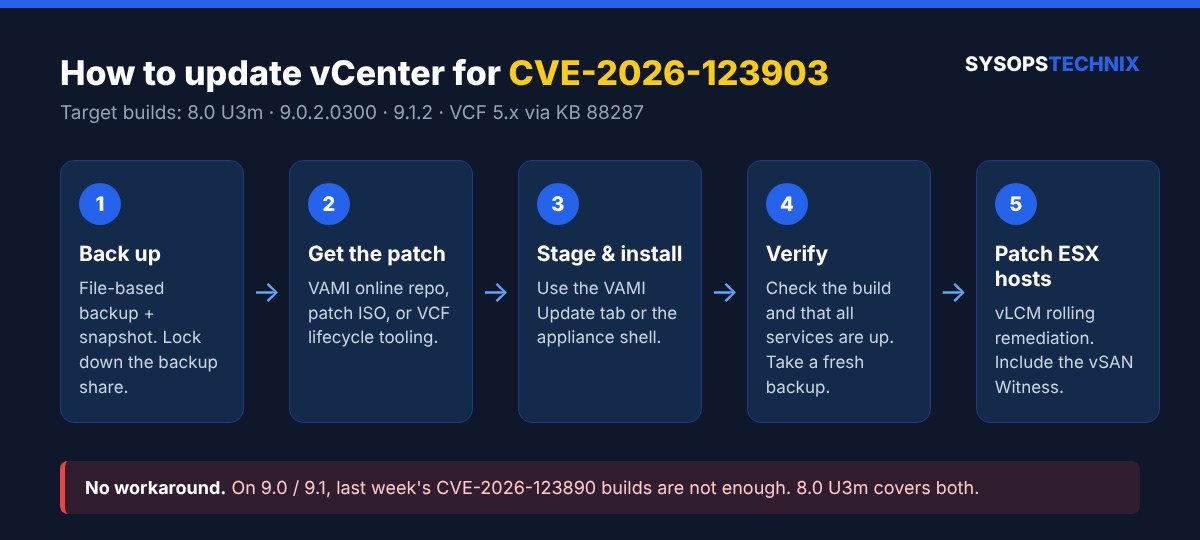
Updating vCenter takes the management plane down for a while (expect the vSphere Client and API to be unavailable during the install), but running VMs keep running. Plan a window, tell whoever runs backups and monitoring that vCenter will disappear for a bit, and go.
1. Back up first, and lock down the backup target
Run a file-based backup from the appliance management interface (VAMI, https://vcenter:5480, Backup tab) and take a snapshot of the vCenter VM. If you use Enhanced Linked Mode, snapshot all linked vCenters at the same point so you can roll them back together. While you’re in there, check who can write to the backup location; that’s exactly what CVE-2026-123904 abuses.
2. Get the patch
Standalone vCenter 8.0 can pull U3m straight from Broadcom’s online repository through VAMI, or you can download the patch ISO from the Broadcom support portal (the 8.0 U3m patch file is named VMware-vCenter-Server-Appliance-8.0.3.01200-25934264-patch-FP.iso) and attach it to the vCenter VM’s CD-ROM. In a VCF deployment, update vCenter through the VCF lifecycle tooling rather than by hand, so your inventory and bill of materials stay consistent. VCF 5.x customers follow the asynchronous patching guide in KB 88287.
3. Stage and install
In VAMI, go to Update, click Check Updates (choose CD-ROM if you mounted the ISO), select the target build and run Stage and Install. Accept the EULA, confirm you have a backup and let it finish; services restart on their own. If you prefer the command line, the appliance shell does the same job:
From the vCenter appliance shell (appliancesh, the default SSH shell)
# Patch from a mounted ISO
software-packages stage --iso --acceptEulas
software-packages list --staged
software-packages install --staged

# Or pull from the default online repository instead
software-packages stage --url --acceptEulas
4. Verify
Once the appliance is back, confirm the build and that every service started:
From the vCenter appliance Bash shell
vpxd -v
service-control --status --all
Log in to the vSphere Client, check that hosts show as connected and that your backup and monitoring tools can talk to vCenter again. Then run a fresh file-based backup so your newest restore point is a patched one.
5. Patch the ESX hosts
Don’t stop at vCenter. Use vSphere Lifecycle Manager to remediate hosts one at a time: maintenance mode, vMotion the workloads off, update, reboot, exit maintenance mode. VMs that can’t migrate will need a short outage. Remember that the vSAN Witness Appliance runs ESX too and needs the same update. Finally, update VMware Tools inside guests on your normal schedule; that fix (CVE-2026-123918) is only moderate.
If you can’t patch tonight
Broadcom lists no workaround for CVE-2026-123903, so nothing here replaces the update. What you can do is shrink the number of systems that can even reach vmdir while you wait for a window:
- Allow vCenter’s management ports (443, 2012, 5480 and 22) only from admin jump hosts or a dedicated management network. Port 2012 is the vmdir RPC port that last week’s exploit used.
- If you want host-level filtering on the appliance itself, Mandiant’s VCSA hardening tool sets up default-deny iptables rules and forwards drop logs to your SIEM. Test it before production use; it’s a third-party script, not a Broadcom fix.
- Turn SSH off on the vCenter appliance (VAMI, Access) unless you’re actively using it.
- Never expose vCenter to the internet. If you find one that is, that’s your first job today.
Signs of compromise to check
There’s no public indicator set for CVE-2026-123903 yet, since nobody has reported exploiting it. But if your vCenter was exposed and unpatched for CVE-2026-123890 too, it’s worth checking for what last week’s attackers left behind. Google’s report has the full indicator list; the quick checks are:
Members of the SSO Administrators group (vCenter Bash shell; prompts for the SSO admin password)
/usr/lib/vmware-vmafd/bin/dir-cli group list --name Administrators
Odd files in /tmp and unfamiliar enabled services on the appliance
ls -la /tmp
systemctl list-unit-files --type=service --state=enabled
Unexpected SSH keys for root on each ESX host
cat /etc/ssh/keys-root/authorized_keys
- Unknown users in vsphere.local, or new members of the Administrators group.
- SSH enabled on the appliance when nobody on your team turned it on.
- Outbound connections from vCenter or ESX hosts to the internet.
- Unexplained datastore browsing or large file copies from VM disks, especially domain controllers.
If you find any of this, treat it as an incident, not a patching task. Isolate the management network, preserve logs and a snapshot for forensics, and bring in your incident response team. Recovery usually means rotating the SSO signing certificates, resetting [email protected] and every privileged account that touched vCenter, and, if domain controller disks were accessed, treating Active Directory as compromised too. Our CVE-2026-123890 guide walks through that scenario in more detail.
FAQ
Is CVE-2026-123903 the same as CVE-2026-123890?
No. Both are authentication bypasses in the VMware Directory Service with a 9.8 score, but Broadcom says CVE-2026-123903 is a new and distinct issue. Systems below the VMSA-2026-0011 fixed versions need this update.
I updated vCenter 8.0 to U3m last week. Do I need to do anything?
Not for vCenter. Broadcom’s Q&A says 8.0 U3m already covers this advisory. Your ESX 8.0 hosts still need ESXi80U3m-25926933 for the ESX bugs.
Is CVE-2026-123903 being exploited?
Not as far as anyone has reported. Broadcom didn’t flag exploitation, and the CVE wasn’t in CISA’s KEV catalog as of November 25, 2026. Given what happened with CVE-2026-123890, we wouldn’t count on that lasting.
Is there a workaround for the vCenter authentication bypass?
No. Broadcom lists none. Restricting network access to vCenter reduces exposure, but the only fix is the update.
Does vCenter 7.0 get a fix?
Only for customers with an extended support contract, who should contact Broadcom Support. Everyone else on 7.0 should treat this as the push to plan an upgrade to 8.0 U3m or later.
Do VMs go down when I update vCenter?
No. Updating vCenter interrupts management (the vSphere Client, API, and anything that depends on them, like backup jobs), but running workloads stay up. ESX host updates are what need maintenance mode and vMotion.
Sources
- Broadcom: VMSA-2026-0011 security advisory
- Broadcom: VMSA-2026-0011 questions and answers
- The Hacker News: VMware vCenter hit by another critical 9.8-rated auth bypass flaw
- Google Threat Intelligence: ARMORY CASTLE exploits vSphere
- CISA Known Exploited Vulnerabilities catalog
- NVD: CVE-2026-123890
- Broadcom KB 88287: VCF asynchronous patching
- Mandiant: VCSA hardening tool