
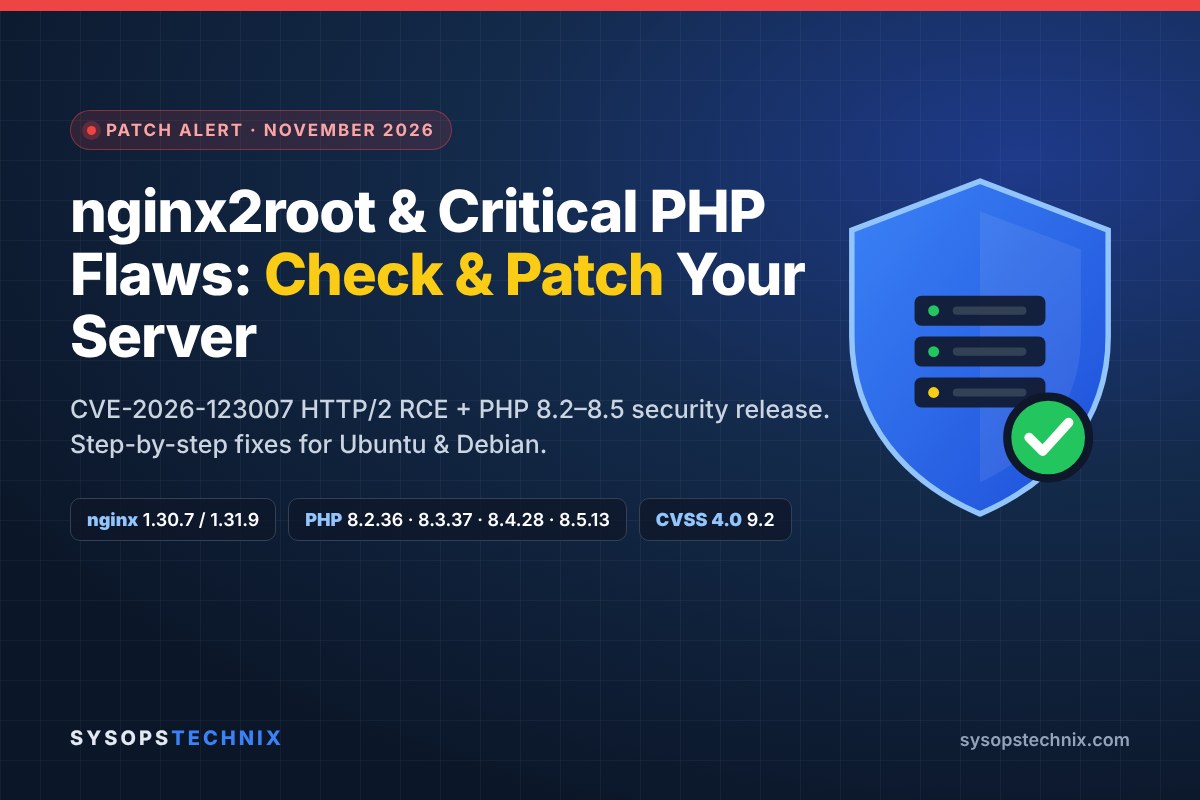
Two of the most widely used pieces of web infrastructure received urgent security fixes in the same week, including the most serious nginx vulnerability of 2026. On 18 November 2026, nginx shipped 1.31.9 and 1.30.7 to fix nginx2root (CVE-2026-123007), a heap overflow in HTTP/2 flow control that has been sitting in the code since 2015. A day later, the PHP team released PHP 8.2.36, 8.3.37, 8.4.28 and 8.5.13 with fixes for a batch of critical session, FPM and memory-safety bugs, several of which can lead to remote code execution.
If you run WordPress, Laravel or any PHP application behind nginx, there is a good chance both apply to you. The good news: patching is quick, and you can check your exposure in a few minutes. This guide walks you through exactly that, with copy-paste commands for Ubuntu and Debian.
TL;DR: what to do today
1. nginx: install your distro’s patched package (or upstream 1.30.7 / 1.31.9), then restart nginx. A reload is not enough.
2. PHP: update to 8.2.36, 8.3.37, 8.4.28 or 8.5.13 (or your distro’s patched build), then restart PHP-FPM.
3. Can’t patch yet? Turn off HTTP/2 and HTTP/3 on the origin, set session.upload_progress.enabled = 0, and make sure fastcgi_keep_conn on is not in use.
4. Plan ahead: PHP 8.2 reaches end of life on 31 December 2026.
In this guide: what each vulnerability does and who is really at risk, a fast “am I affected?” check, step-by-step patching for nginx and PHP, temporary mitigations if you can’t patch immediately, and how to look for signs of compromise.
What Happened? The November 2026 nginx and PHP Security Releases
Here is the timeline at a glance:
| Date (2026) | Event |
|---|---|
| 14 Oct | nginx 1.31.7 / 1.30.6 fix five earlier bugs (alias/rewrite overflow, HTTP/3, TLS session tickets, AIO). |
| 21–23 Oct | PHP 8.2.35 to 8.5.12 fix two critical RCE bugs; php.net advises setting session.upload_progress.enabled=0 as a precaution. |
| 18 Nov | nginx 1.31.9 (mainline) and 1.30.7 (stable) fix nginx2root plus nine other CVEs. PHP announces an upcoming critical security release. |
| 19 Nov | PHP 8.2.36, 8.3.37, 8.4.28, 8.5.13 and 8.6.0 released. Ubuntu publishes USN-9159-1 for nginx; Debian issues DSA-6642-1 / DLA-4918-1. |
| 20 Nov | Ubuntu follow-up nginx update (USN-9182-1) for three more nginx CVEs. |
At the time of writing, a public proof of concept exists for nginx2root, but none of the vendors or researchers involved had reported exploitation in the wild. That window is exactly when you want to patch.
nginx2root (CVE-2026-123007) Explained
nginx2root is a bug in how nginx tracks the HTTP/2 flow-control window, the counter that says how much data nginx is allowed to send on a connection. Under a specific sequence of HTTP/2 frames, the counter can be pushed past its maximum. A later size check then goes wrong and nginx copies more data than the buffer can hold. Usually this just crashes a worker process, but researchers showed it can be turned into remote code execution as the nginx worker user, without any login. That makes it an unauthenticated nginx RCE vulnerability, the worst kind.
- Affected: every nginx version from 1.9.5 (September 2015) to 1.31.8, when HTTP/2 is enabled.
- Fixed upstream in: 1.31.9 (mainline) and 1.30.7 (stable). Distros have backported the fix to their own versions (see below).
- Severity: nginx rates it major; it carries a CVSS 4.0 score of 9.2. Ubuntu rates it High (CVSS 3.1 8.1).
- Root access? The worker runs as an unprivileged user. Researchers reached root only by chaining a separate Linux kernel SCTP bug, so a second flaw is needed for full takeover.
Why the name matters: HTTP/2 is turned on by most modern nginx configs (listen 443 ssl http2; or http2 on;). If your server speaks HTTP/2 to the internet, assume you are in scope until you have patched.
The other nginx CVEs fixed in the same release
nginx2root got the headlines, but 1.31.9 and 1.30.7 fix ten issues in total. These are the ones that can matter for a typical web server:
| CVE | Area | Only if you use… | Affected range |
|---|---|---|---|
| CVE-2026-123007 | HTTP/2 flow control (nginx2root) | HTTP/2 | 1.9.5 – 1.31.8 |
| CVE-2026-123633 | HTTP/2 use-after-free | HTTP/2 + proxy_pass, worker_connections exhausted | 1.19.7 – 1.31.8 |
| CVE-2026-121810 | HTTP/3 use-after-free | HTTP/3 (QUIC) | 1.25.0 – 1.31.8 |
| CVE-2026-123634 | Resolver use-after-free | resolver + variables in proxy_pass + mirror/SSI subrequests | 0.6.18 – 1.31.8 |
| CVE-2026-113425 | Mail proxy use-after-free | nginx mail module | 0.5.33 – 1.31.8 |
| CVE-2026-118899 | Endless loop reading request body over TLS 1.3 | TLS | 1.13.0 – 1.31.8 |
| CVE-2026-125283 | Buffer overflow | alias with try_files | 0.9.6 – 1.31.8 |
The remaining three (stream SNI client-certificate bypass, PROXY protocol v2 crash, and ssl_preread validation) only affect the stream module or very recent mainline builds. Full details are on the official nginx security advisories page.
The Critical PHP Vulnerabilities and Security Update, Explained
PHP’s own advance notice said the highest severity in this batch is critical, but that the critical issues “require either non-default configuration or uncommon setups”. In other words: most sites are not trivially exploitable, but you should not try to guess which side of that line you are on. Treat this PHP security update as urgent. Here are the issues that matter most for web servers:
| CVE | Component | What it can do | Main condition |
|---|---|---|---|
| CVE-2026-126714 | Session | Partially overwritten session file → remote code execution (“phpAfterShell”) | File-based sessions; needs a deserialization gadget in the app |
| CVE-2026-115560 | Session | Serializer mismatch → remote code execution | App switches session.serialize_handler at runtime |
| CVE-2026-129481 | Session | Use-after-free after interrupted session shutdown | Sessions in use |
| CVE-2026-129289 | PHP-FPM | Request smuggling → attacker-controlled PHP code runs | Front end keeps FastCGI connections open (e.g. fastcgi_keep_conn on) and app leaves php://input unread |
| CVE-2026-129291 | PHP-FPM | Local privilege escalation (CVSS 8.8) | catch_workers_output on + epoll + local code execution |
| CVE-2026-129292 | PHP-FPM | XSS on the FPM status page | FPM status page exposed |
| CVE-2026-129496 | Date | Timezone cache use-after-free → crash or RCE | Unauthenticated, remote |
| CVE-2026-129474 | Core | Use-after-free in magic method backtraces → RCE | PHP 8.5+ only |
| CVE-2026-129182 | Core | Use-after-free in fatal error backtrace | Newer branches |
The same releases also fix bugs in CGI (PATH_INFO), Phar signature checks, SOAP, DOM, URL handling and the URI extension. Not every fix exists in every branch: some of the Core bugs only affect PHP 8.5, and older branches only receive the fixes that apply to them. Check the official PHP 8 ChangeLog for your branch.
Am I Affected? A 5-Minute Check
Run these commands on your server (not your laptop) to see whether the nginx vulnerability or the PHP vulnerabilities affect you. If you use managed WordPress hosting, skip to the FAQ: your host handles nginx and PHP for you.
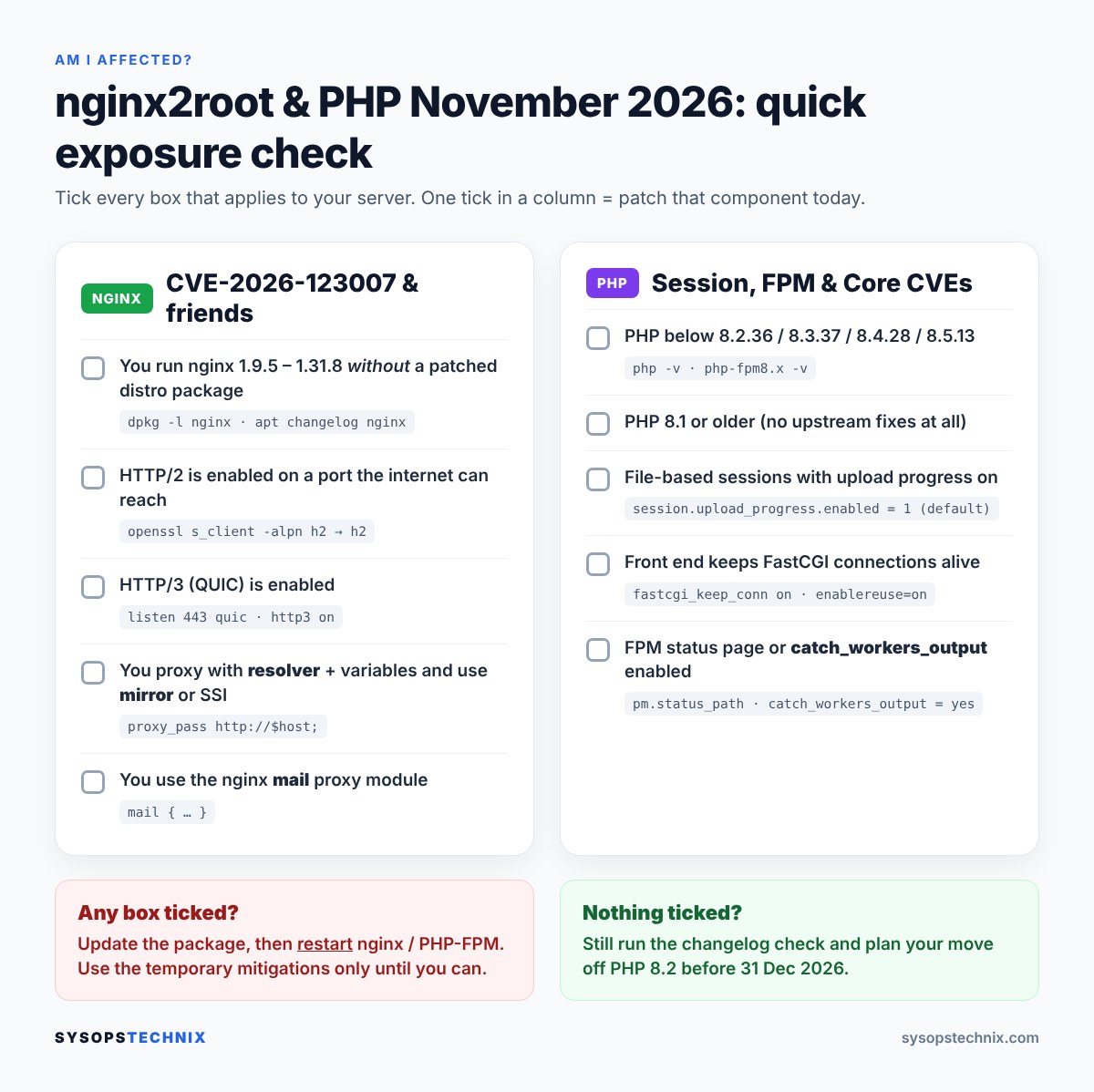
1. Check your nginx version and package build
Upstream version and the exact Ubuntu/Debian package build
nginx -v
dpkg -l | grep -E '^ii\s+(nginx|libnginx)'
apt policy nginx
Don’t panic if nginx -v shows an old number. Ubuntu and Debian backport security fixes without changing the upstream version, so Ubuntu 24.04 still reports nginx/1.24.0 after patching. The package version (for example 1.24.0-2ubuntu7.20) is what tells you whether you are fixed.
2. Check which features are switched on
Look for HTTP/2, HTTP/3, the mail module, resolver and mirror
sudo nginx -T 2>/dev/null | grep -nE 'http2|quic|http3|^\s*mail\s*\{|resolver|mirror|fastcgi_keep_conn'
Confirm from the outside whether HTTP/2 is offered (replace the IP and hostname)
openssl s_client -connect 203.0.113.10:443 -servername example.com -alpn h2 </dev/null 2>/dev/null | grep ALPN
Output
ALPN protocol: h2          <- HTTP/2 is enabled and reachable
No ALPN negotiated         <- HTTP/2 is off
If your site sits behind Cloudflare or another CDN, run the check against your origin IP, not the public hostname. The CDN talks HTTP/2 to visitors either way; what matters is whether your own nginx accepts it.
3. Check your PHP version
CLI and FPM can differ, so check both
php -v | head -1
ls /etc/php/
for v in /etc/php/*/; do v=$(basename "$v"); command -v php-fpm$v >/dev/null && php-fpm$v -v | head -1; done
You are patched if you see 8.2.36, 8.3.37, 8.4.28, 8.5.13 or newer (or a distro build that lists the fixes in its changelog). Anything lower in those branches needs updating. PHP 8.1 and older no longer get upstream fixes at all.
4. Confirm the fix is really in your package
Search the package changelog for the CVE IDs
apt changelog nginx 2>/dev/null | grep -oE 'CVE-2026-(123007|123633|123634|121810|113425)' | sort -u
Every CVE that prints is fixed in the version you have installed or are about to install.
How to Fix the nginx Vulnerability on Ubuntu and Debian
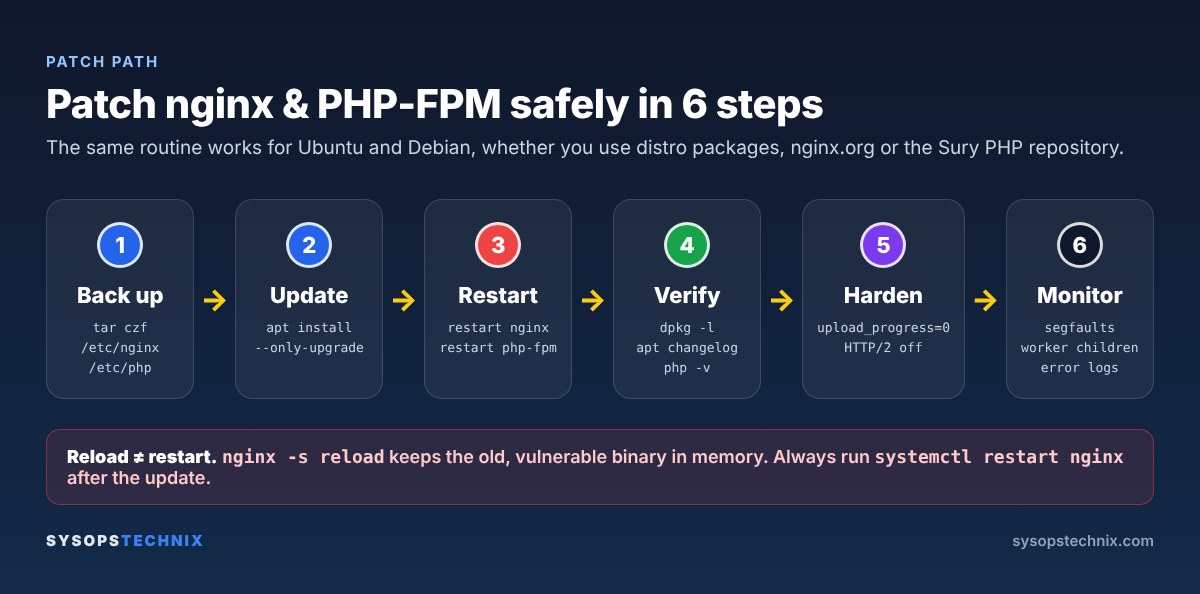
Ubuntu and Debian have already shipped fixed packages for nginx2root, so for most people this is a normal package update.
| Distribution | Fixed nginx package (CVE-2026-123007) | Notice |
|---|---|---|
| Ubuntu 26.04 LTS | 1.28.3-2ubuntu1.13 | USN-9159-1 |
| Ubuntu 24.04 LTS | 1.24.0-2ubuntu7.20 (7.21 adds more fixes) | USN-9159-1, USN-9182-1 |
| Ubuntu 22.04 LTS | 1.18.0-6ubuntu14.23 | USN-9159-1 |
| Ubuntu 20.04 / 18.04 | ESM builds (Ubuntu Pro) | USN-9159-1 |
| Debian 13 trixie | 1.26.3-3+deb13u11 | DSA-6642-1 |
| Debian 12 bookworm | 1.22.1-9+deb12u11 | DLA-4918-1 |
| nginx.org packages | 1.30.7 (stable) / 1.31.9 (mainline) | nginx advisories |
Step 1: Back up your configuration
sudo tar czf /root/nginx-backup-$(date +%F).tgz /etc/nginx
Step 2: Update only the nginx packages
sudo apt update
sudo apt install --only-upgrade nginx nginx-common $(dpkg -l 'libnginx-mod-*' 2>/dev/null | awk '/^ii/{print $2}')
If apt asks whether to replace a configuration file such as nginx.conf, answer N to keep your version.
Step 3: Restart nginx (don’t just reload)
sudo nginx -t && sudo systemctl restart nginx
systemctl status nginx --no-pager | head -5
Restart, don’t reload. nginx -s reload and systemctl reload nginx keep the old master process running the old binary, so you would still be vulnerable. A full restart loads the patched code.
Step 4: Verify
dpkg -l nginx | tail -1
apt changelog nginx 2>/dev/null | grep -c 'CVE-2026-123007'
ps -o pid,lstart,cmd -C nginx
The package version should match the table above, the changelog count should be at least 1, and the nginx processes should show a start time from after the update.
Alternative: switch to the official nginx.org packages
If you need upstream 1.30.7 / 1.31.9 exactly (for example on a release without a distro fix), use the nginx.org repository:
Ubuntu
sudo apt install -y curl gnupg2 ca-certificates lsb-release ubuntu-keyring
curl -fsSL https://nginx.org/keys/nginx_signing.key | gpg --dearmor | sudo tee /usr/share/keyrings/nginx-archive-keyring.gpg >/dev/null
echo "deb [signed-by=/usr/share/keyrings/nginx-archive-keyring.gpg] http://nginx.org/packages/ubuntu $(lsb_release -cs) nginx" | sudo tee /etc/apt/sources.list.d/nginx.list
printf 'Package: *\nPin: origin nginx.org\nPin: release o=nginx\nPin-Priority: 900\n' | sudo tee /etc/apt/preferences.d/99nginx
sudo apt update && sudo apt install nginx
Debian
sudo apt install -y curl gnupg2 ca-certificates lsb-release debian-archive-keyring
curl -fsSL https://nginx.org/keys/nginx_signing.key | gpg --dearmor | sudo tee /usr/share/keyrings/nginx-archive-keyring.gpg >/dev/null
echo "deb [signed-by=/usr/share/keyrings/nginx-archive-keyring.gpg] http://nginx.org/packages/debian $(lsb_release -cs) nginx" | sudo tee /etc/apt/sources.list.d/nginx.list
printf 'Package: *\nPin: origin nginx.org\nPin: release o=nginx\nPin-Priority: 900\n' | sudo tee /etc/apt/preferences.d/99nginx
sudo apt update && sudo apt install nginx
Test this on staging first. The nginx.org package reads /etc/nginx/conf.d/*.conf, not sites-enabled/, so add include /etc/nginx/sites-enabled/*; to the http block if you rely on it. Distro module packages (libnginx-mod-*) are not compatible with the nginx.org binary. Keep the backup from Step 1 handy.
Can’t Patch Right Now? Temporary Mitigations
These buy you time against the nginx vulnerability. They are not a replacement for updating, because each one only blocks part of the attack surface.
Turn off HTTP/2 on the origin (blocks CVE-2026-123007 and CVE-2026-123633)
nginx 1.25.1 and later: in every server block
listen 443 ssl;
listen [::]:443 ssl;
http2 off;
nginx 1.9.5 to 1.25.0 (e.g. Ubuntu 24.04’s 1.24): remove http2 from the listen lines
sudo cp -a /etc/nginx /root/nginx-before-http2-off
sudo grep -rl 'ssl http2' /etc/nginx/sites-enabled/ | xargs -r sudo sed -i --follow-symlinks 's/ssl http2;/ssl;/'
sudo nginx -t && sudo systemctl restart nginx
Every server block that shares a listener must be changed, including the IPv6 [::]:443 lines. Re-run the openssl s_client check afterwards and look for No ALPN negotiated. Behind a CDN, visitors keep HTTP/2 and HTTP/3 because the CDN serves them; in Cloudflare, also switch off Speed → Settings → HTTP/2 to Origin.
Turn off HTTP/3 (blocks CVE-2026-121810)
# remove any 'listen 443 quic' lines, then add inside the server block:
http3 off;
add_header Alt-Svc 'clear' always;
Other nginx features
- resolver + mirror (CVE-2026-123634): use a fixed
upstreamblock instead of a variable inproxy_pass, or setmirror off;until patched. - Mail proxy (CVE-2026-113425): bind IMAP/POP3/SMTP listeners to
127.0.0.1or firewall them to trusted networks.
Block the kernel SCTP module (cuts the known path to root)
echo 'install sctp /bin/false' | sudo tee /etc/modprobe.d/disable-sctp.conf
lsmod | grep sctp || echo "sctp not loaded"
This stops the module from loading in future. If lsmod shows it already loaded, reboot at a convenient time. Skip this if you actually use SCTP (rare on web servers).
Lock your origin to your CDN (if you use one)
Attackers need to reach nginx directly over HTTP/2. If you are behind Cloudflare, only allow ports 80/443 from Cloudflare’s published IP ranges, either in your cloud provider’s firewall (recommended) or with UFW:
for ip in $(curl -fsS https://www.cloudflare.com/ips-v4) $(curl -fsS https://www.cloudflare.com/ips-v6); do
  sudo ufw allow proto tcp from "$ip" to any port 443 comment 'Cloudflare'
done
sudo ufw status numbered   # then delete any broad 'allow 443' / 'Nginx Full' rules
Don’t lock yourself out. Make sure SSH is explicitly allowed before enabling or changing UFW, keep your current session open while you test, and remember that Docker-published ports bypass UFW.
How to Fix the PHP Vulnerabilities on Ubuntu and Debian
First work out where your PHP comes from, because that decides how you update it:
apt policy php$(php -r 'echo PHP_MAJOR_VERSION.".".PHP_MINOR_VERSION;')-fpm
- Version string contains
deb.sury.org: you use the Ondřej Surý repository (ppa:ondrej/phpon Ubuntu,packages.sury.orgon Debian). It tracks upstream releases, so 8.2.36 / 8.3.37 / 8.4.28 / 8.5.13 arrive as normal updates. - Plain Ubuntu or Debian version (e.g. PHP 8.3 on Ubuntu 24.04, 8.1 on 22.04, 8.4 on Debian 13, 8.2 on Debian 12): your distro backports security fixes into its own builds. Check the changelog and the Ubuntu/Debian security trackers for the CVE IDs above.
Step 1: Back up and update all installed PHP packages
sudo tar czf /root/php-backup-$(date +%F).tgz /etc/php
sudo apt update
sudo apt install --only-upgrade $(dpkg -l 'php*' | awk '/^ii/{print $2}')
This only upgrades PHP packages you already have, across every installed version. Answer N if asked to replace a modified php.ini or pool file.
Step 2: Restart PHP-FPM (and Apache if you use mod_php)
for s in $(systemctl list-units --type=service --no-legend 'php*-fpm.service' | awk '{print $1}'); do
  sudo systemctl restart "$s" && echo "restarted $s"
done
# only if you run Apache with mod_php:
# sudo systemctl restart apache2
Step 3: Verify
php -v | head -1
php-fpm8.3 -v | head -1        # use your version
systemctl list-units --type=service --no-legend 'php*-fpm.service'
Debian: adding the Sury repository (only if you need upstream PHP builds)
sudo apt install -y lsb-release ca-certificates curl
curl -fsSLo /tmp/debsuryorg-archive-keyring.deb https://packages.sury.org/debsuryorg-archive-keyring.deb
sudo dpkg -i /tmp/debsuryorg-archive-keyring.deb
echo "deb [signed-by=/usr/share/keyrings/debsuryorg-archive-keyring.gpg] https://packages.sury.org/php/ $(lsb_release -sc) main" | sudo tee /etc/apt/sources.list.d/php.list
sudo apt update
PHP Hardening That Reduces Your Risk Today
1. Disable session upload progress
php.net already recommended this in October as a precaution, and it closes the easiest path to the session bugs. WordPress core does not use this feature (upload progress bars come from the browser).
# replace 8.3 with your version; repeat for each installed version
echo 'session.upload_progress.enabled = 0' | sudo tee /etc/php/8.3/fpm/conf.d/99-security.ini
sudo php-fpm8.3 -t && sudo systemctl restart php8.3-fpm
php-fpm8.3 -i | grep upload_progress.enabled
Set it in php.ini or the FPM pool, not in code. php.net warns that ini_set() and .user.ini apply too late in the request to help. In a pool file use php_admin_flag[session.upload_progress.enabled] = off.
2. Make sure FastCGI connections are not kept alive
The FPM request smuggling bug (CVE-2026-129289) needs a front end that reuses backend connections. nginx does not do this by default, but check:
sudo grep -Rn 'fastcgi_keep_conn' /etc/nginx/
sudo grep -Rn 'enablereuse=on' /etc/apache2/ 2>/dev/null
If either prints a match, switch it off (fastcgi_keep_conn off; or remove enablereuse=on) until PHP is patched.
3. Check catch_workers_output and the FPM status page
sudo grep -RnE '^\s*(catch_workers_output|pm.status_path)' /etc/php/*/fpm/pool.d/
catch_workers_output = yesis needed for CVE-2026-129291. Leave it off unless you rely on it.- If
pm.status_pathis set, make sure the matching nginx location only allows127.0.0.1(allow 127.0.0.1; deny all;), because of the status-page XSS (CVE-2026-129292).
4. Plan your exit from PHP 8.2
PHP 8.2 is already security-only and reaches end of life on 31 December 2026. Some of this month’s fixes only exist in newer branches, so the real long-term fix for 8.2 sites is an upgrade.
| Branch | Latest (Nov 2026) | Security support until |
|---|---|---|
| PHP 8.2 | 8.2.36 | 31 Dec 2026 |
| PHP 8.3 | 8.3.37 | 31 Dec 2027 |
| PHP 8.4 | 8.4.28 | 31 Dec 2028 |
| PHP 8.5 | 8.5.13 | 31 Dec 2029 |
| PHP 8.6 | 8.6.0 | 31 Dec 2030 |
For WordPress, PHP 8.4 is a sensible target: install it alongside your current version, point a staging site’s nginx fastcgi_pass at the new socket, test your theme and plugins, then switch production.
Check for Signs of Compromise
Patching closes the door; it does not tell you whether someone walked through it first. These quick checks are worth running once, especially if your server was exposed with HTTP/2 enabled:
nginx worker crashes (segfaults are the most common side effect of exploit attempts)
sudo grep -Ei 'worker process .* exited on signal|segfault' /var/log/nginx/error.log* | tail -20
sudo journalctl -k --since '14 days ago' | grep -i 'nginx.*segfault'
coredumpctl list nginx 2>/dev/null | tail
nginx workers should never start child processes
for pid in $(pgrep -f 'nginx: worker'); do ps --ppid "$pid" -o pid,user,cmd --no-headers; done
Long-lived connections with lots of incoming data (run twice, a minute apart)
sudo ss -tinp state established '( sport = :443 )' | grep -E 'bytes_received|users' | head -40
Connections owned by nginx or PHP-FPM: look for remote addresses that are not your CDN, database or APIs
sudo ss -tnp state established | grep -E '"(nginx|php-fpm)'
Also review recently modified PHP files in your web root (find /var/www -name '*.php' -mtime -7) and new WordPress admin users. Remember that HTTP/2 attack traffic may leave few or no lines in the access log, so a clean access log on its own proves nothing.
Your Post-Patch Checklist
- nginx package shows the fixed version and the changelog lists CVE-2026-123007
- nginx was restarted, not reloaded
- HTTP/2 / HTTP/3 on the origin are either patched or switched off
- PHP shows 8.2.36 / 8.3.37 / 8.4.28 / 8.5.13 (or a patched distro build) for CLI and FPM
- PHP-FPM restarted;
session.upload_progress.enabledis Off - No
fastcgi_keep_conn on, FPM status page restricted - SCTP blocked if unused; origin firewalled to your CDN
- Pending kernel updates installed and server rebooted
- Error logs and worker processes checked for anything unusual
- PHP 8.2 upgrade planned before 31 December 2026
If you want to go further, my guides on hardening a small business server and the pre-launch checklist for Linux web servers cover firewalls, SSH, TLS and security headers in more depth, and my nginx location modifiers guide helps if you are reworking server blocks.
Frequently Asked Questions
Is my WordPress site affected by nginx2root?
WordPress itself is not the vulnerable part; the web server is. If your site runs on nginx with HTTP/2 enabled and an unpatched package, it is affected. On managed WordPress hosting, your provider patches nginx and PHP for you, but it is still worth asking them to confirm.
I use Cloudflare. Am I safe?
Partly. Cloudflare terminates HTTP/2 from visitors, so attack traffic sent to your domain hits Cloudflare, not you. But if your origin IP is reachable directly and nginx accepts HTTP/2, an attacker can bypass Cloudflare. Patch anyway, and firewall the origin to Cloudflare’s IP ranges.
Why does nginx -v still show an old version after updating?
Ubuntu and Debian backport fixes into the version they originally shipped. Ubuntu 24.04 stays on 1.24.0, but the package release changes (for example to 1.24.0-2ubuntu7.20). Use dpkg -l nginx and apt changelog nginx to confirm the fix.
Is nginx 1.24.0 on Ubuntu 24.04 vulnerable?
Upstream nginx 1.24.0 is in the affected range (1.9.5 to 1.31.8), but Ubuntu patches its own build. On Ubuntu 24.04 you are protected from nginx2root once the package is 1.24.0-2ubuntu7.20 or later (dpkg -l nginx), even though nginx -v still prints 1.24.0. The same idea applies to 1.18.0 on Ubuntu 22.04 and 1.22.1 / 1.26.3 on Debian: check the package version, not the upstream number.
Is reloading nginx enough after the update?
No. A reload keeps the old binary running. Use systemctl restart nginx.
Should I turn HTTP/2 back on after patching?
If visitors connect to nginx directly, yes: HTTP/2 helps page load times. If you are behind a CDN, there is little benefit to HTTP/2 between the CDN and your origin, so leaving it off reduces your attack surface for free.
Which PHP versions fix the November 2026 PHP vulnerabilities?
PHP 8.2.36, 8.3.37, 8.4.28 and 8.5.13 (released 19 November 2026) are the security updates for this batch, and PHP 8.6.0 shipped with the fixes included. Ubuntu and Debian users on distro PHP packages should check apt changelog for the CVE IDs instead of the version number.
Do I have to upgrade from PHP 8.2 right now?
Update to 8.2.36 today. Then plan a move to 8.3 or newer before 31 December 2026, when 8.2 stops receiving security fixes, because some of this month’s fixes only exist in the newer branches.
Found this useful? Share it with your team or anyone running nginx and PHP, and subscribe to the newsletter for the next patch alert. If you hit an error while patching, drop it in the comments and I’ll help you work through it.
Sources and Further Reading
- nginx security advisories and nginx CHANGES (1.31.9)
- Ubuntu: CVE-2026-123007 and USN-9182-1
- Debian security tracker: CVE-2026-123007
- PHP 8 ChangeLog, PHP news archive 2026 and PHP supported versions
- CIRCL TR-105: nginx2root
- Wiz: nginx HTTP/2 RCE vulnerabilities and Xint: nginx2root write-up
- The Hacker News: 10-year-old nginx HTTP/2 flaw and PHP fixes critical flaws