Introduction
Software releases can become stressful when teams have to deal with failed deployments, last-minute code changes, configuration issues, or unexpected production errors. These problems often point to gaps in the development and deployment process rather than a lack of tools.
A reliable release process comes from habits that teams follow consistently. Developers need to integrate code regularly, testers need to catch defects before deployment, and operations teams need clear ways to monitor applications and recover when something goes wrong.
DevOps brings these activities together. But adopting DevOps does not mean adding more tools to the technology stack. It means building a workflow where code moves through development, testing, staging, and production with fewer manual steps and better visibility.
Here are seven practical DevOps habits that help engineering teams manage software releases with greater confidence.
1. Build a CI/CD Pipeline That Handles Repetitive Work
A CI/CD pipeline automates the steps between a code change and its deployment. It gives every change a consistent route through build, testing, security checks, and release preparation.
Without an automated pipeline, developers may follow different deployment steps or miss a configuration change. These small differences can cause problems when the application reaches production.
Define Clear Stages in the Pipeline
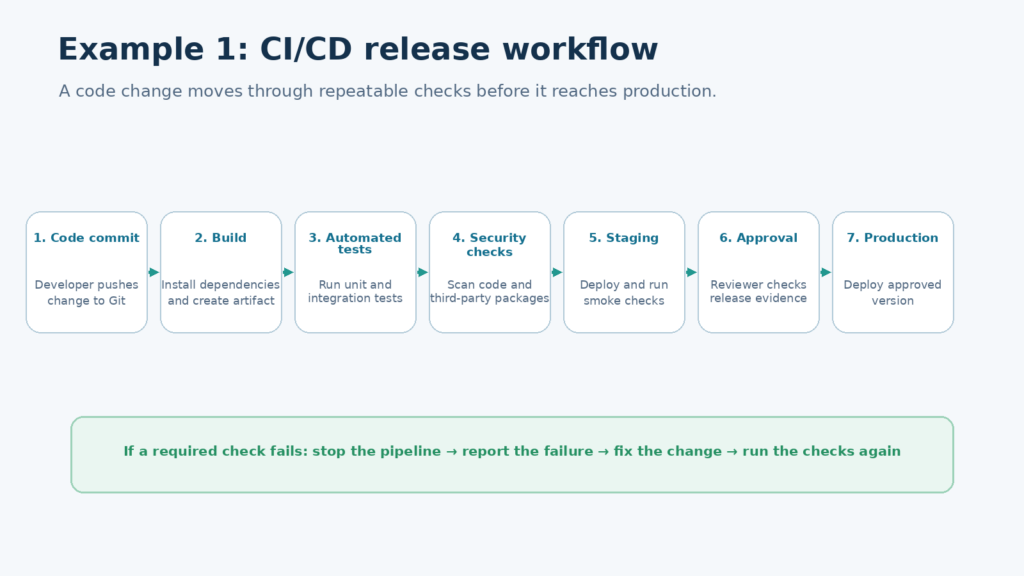
A practical pipeline can include the following stages:
- Code commit: A developer pushes changes to a Git repository.
- Build: The pipeline installs dependencies and creates the application build.
- Automated tests: Unit tests, integration tests, and other required checks run.
- Security checks: Dependency and code scans identify known vulnerabilities.
- Staging deployment: The application is deployed to a production-like environment.
- Approval and production release: The release moves to production after the required checks and approvals pass.
Teams can implement this workflow using Jenkins, GitLab CI/CD, or GitHub Actions.
For example, a team using GitHub Actions can trigger a workflow whenever a pull request is opened. The workflow can build the application, run tests, and report failures directly on the pull request. Once the changes are merged into the main branch, a separate deployment job can prepare the staging release.
Production deployment can require approval from a designated reviewer. This is particularly useful for applications where an unexpected release could affect customer transactions or business operations.
Example CI/CD release flow
Keep Development, Staging, and Production Configurations Consistent
An application may work correctly in development but fail in production because of different environment variables, database versions, permissions, or service configurations. Use environment-specific configuration files and secure secret management rather than hardcoding credentials or connection details into the application.
Keep the underlying infrastructure as similar as practical across environments. This makes testing more representative of the production setup.
2. Make Small Code Changes and Review Them Regularly
Large releases are harder to test and troubleshoot. When several features, bug fixes, and configuration changes are deployed together, identifying the source of a problem becomes difficult. Smaller changes give teams more control over what enters production.
Use Pull Requests and Code Reviews
Developers should work on feature branches and submit pull requests before merging changes into the main branch. A useful code review should check whether the change solves the intended problem, whether existing functionality could be affected, whether error handling and input validation are adequate, whether automated tests cover the new behaviour, and whether the code introduces unnecessary dependencies or security risks.
Code reviews should focus on the quality of the change rather than simply approving it.
Avoid Keeping Feature Branches Open for Too Long
Long-running branches often create merge conflicts because other developers continue changing the same parts of the application. Integrating smaller changes more frequently reduces this problem. Feature flags can also help teams merge unfinished functionality without making it immediately available to users.
For example, a new payment feature can be merged into the main codebase while remaining disabled through a feature flag. The team can test it in staging and enable it for selected users after validation.
3. Automate Testing Before Every Production Release
A successful build does not necessarily mean an application is ready for production. Code may compile correctly while still containing logic errors, broken integrations, or performance problems. Automated testing helps teams catch these issues before deployment.
Combine Different Types of Automated Tests
Each test type checks a different part of the application:
- Unit testing: Checks individual functions, methods, and components.
- Integration testing: Verifies that services, APIs, databases, and other components work together.
- Regression testing: Checks whether recent changes have affected existing functionality.
- End-to-end testing: Tests complete user journeys, such as registration, login, or checkout.
- Performance testing: Checks how the application behaves under expected and increased workloads.
Tools such as JUnit, PyTest, Jest, Selenium, and JMeter can support different testing requirements.
For example, consider an eCommerce application that introduces a new checkout option. Unit tests can validate the payment calculation, integration tests can check communication with the payment gateway, and end-to-end tests can verify the complete checkout journey.
Running these tests automatically through the CI pipeline reduces the need for repeated manual checks.
Set Quality Gates That Stop Faulty Builds
A quality gate defines the conditions a build must meet before moving to the next stage. These conditions may include all critical automated tests passing, no unresolved critical security vulnerabilities, required code review approvals, and successful generation of build and deployment artifacts.
Do not rely only on code coverage percentages. A high coverage number does not guarantee that tests check the most important application behaviour. Teams should review failed checks before allowing a release to continue.
4. Manage Infrastructure Through Code
Infrastructure changes can create release problems just as easily as application code changes. For example, a developer may update a server manually to resolve an issue. If the same change is not applied to other environments, the application may behave differently after deployment. Infrastructure as Code (IaC) helps prevent this by defining infrastructure through version-controlled configuration files.
Use Terraform to Make Infrastructure Repeatable
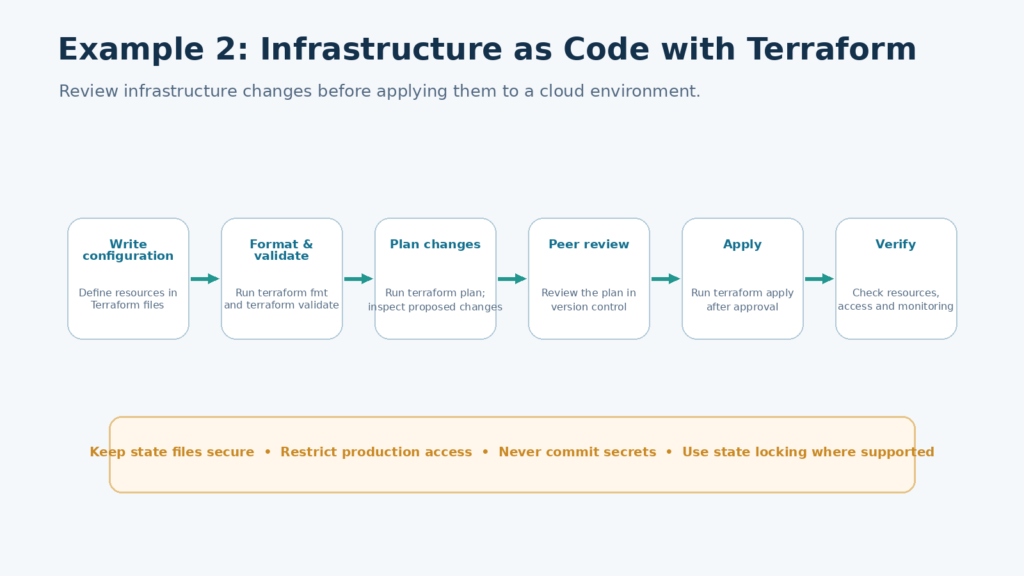
Terraform allows teams to describe cloud resources in configuration files and manage changes through a controlled workflow. A typical process looks like this:
- Write or update the Terraform configuration.
- Run
terraform fmtto format the files. - Run
terraform validateto check the configuration. - Run a
terraform planto review the proposed infrastructure changes. - Review and approve the plan.
- Run
terraform applyto provision or update the resources.
The plan stage is important. It allows engineers to review which resources will be created, modified, or destroyed before applying changes. Terraform state should also be stored securely, with access controls and appropriate state locking. Teams should avoid committing sensitive values or state files containing secrets to public repositories.
Keep Infrastructure Changes Under Version Control
Store Terraform files in Git, just like application code. Use pull requests to review changes to networking, compute resources, databases, and access policies. This gives the team a history of infrastructure changes and makes it easier to identify when a configuration was introduced.
Practical example: Nimap Infotech worked with Canopi to automate AWS infrastructure using Terraform. The implementation included reusable infrastructure modules, Amazon ECS, RDS PostgreSQL, ElastiCache Redis, and CloudWatch monitoring. The setup helped standardize infrastructure provisioning and support a highly available cloud environment.
Infrastructure change workflow
5. Monitor Applications After Deployment
A deployment completing successfully does not mean the release is working as expected. An application may experience increased response times, failed API requests, database connection issues, or memory consumption problems after new code reaches production. Monitoring helps teams identify these issues before they affect more users.
Track Logs, Metrics, and Traces
These three sources provide different types of information:
- Logs record application events, errors, warnings, and other useful details.
- Metrics show measurable information such as CPU usage, memory consumption, request rates, and error percentages.
- Distributed traces help engineers follow a request as it moves across multiple services.
Tools such as Prometheus, Grafana, and the ELK Stack can help teams collect and review operational data.
For example, if an application starts responding slowly after deployment, engineers can check application latency metrics, review error logs, and trace requests across backend services. This makes it easier to identify whether the problem is related to a recent code change, a database query, or communication between services.
Set Alerts Around Application Behaviour
Alerts should be connected to conditions that require action. Teams can configure alerts when the application error rate crosses an agreed threshold, API response times remain higher than the defined limit, CPU or memory usage stays unusually high, database connections approach configured limits, or background jobs begin failing or building up in queues.
Avoid creating alerts for every minor change in system activity. Too many notifications can make it harder for engineers to identify genuine problems.
6. Prepare Rollback and Recovery Plans Before Deployment
Every production release should have a clear recovery plan. If a deployment introduces a critical issue, the team should know how to restore the previous stable version. Rollback planning should happen before the release, not during an incident.
Use Versioned Builds and Controlled Deployments
Keep deployment artifacts versioned so that the team can identify and redeploy a previously tested build. Container image tags should refer to specific versions or immutable digests rather than relying only on a moving tag such as latest.
Blue-Green Deployment:
The team maintains two production environments. The current version serves users while the updated version is deployed and tested in the other environment. Traffic is switched after the new version passes the required checks. If a serious issue appears, traffic can be directed back to the previous environment, provided the application and data changes support that recovery.
Canary Deployment:
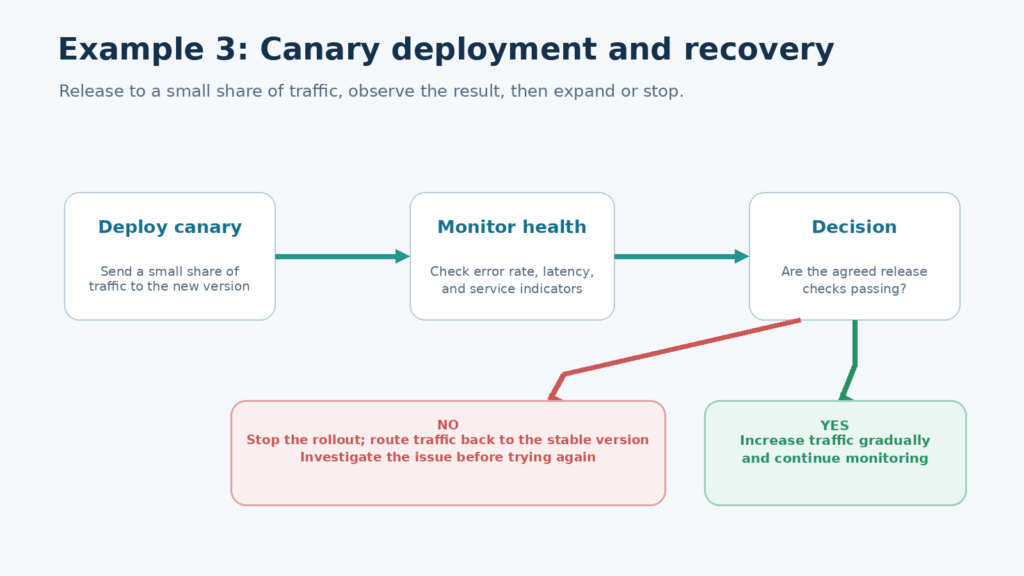
The new version is first released to a small portion of users or traffic. The team monitors error rates, response times, and other key indicators before increasing the rollout. If the new version performs poorly, the rollout can be stopped while the existing version continues serving the remaining traffic.
Check Database Changes Before Rolling Back
Application rollback is not always as simple as restoring an older build. A new release may change database schemas or stored data. If the previous application version cannot work with those changes, switching back may create additional problems.
Use backward-compatible database migrations wherever possible. Take appropriate backups, test recovery procedures, and document the steps required to restore data when necessary. A rollback plan should also identify who can initiate it and which conditions require a rollback.
Example canary release and recovery flow
7. Review Releases and Learn From Incidents
Even teams with mature DevOps practices experience deployment failures. What matters is how quickly they identify the cause and prevent the same issue from happening again. A short release review can help teams identify gaps in testing, deployment automation, infrastructure configuration, or communication.
Conduct Blameless Postmortems
After a significant incident, bring together the developers, testers, and operations engineers involved in the release. The discussion should cover what happened and when the issue started; which application or infrastructure components were affected; how the team identified and responded to the problem; whether monitoring and alerts worked as expected; what caused the incident; and what changes will reduce the chance of a similar issue.
Avoid making the discussion about individual mistakes. Focus on the process and technical conditions that allowed the issue to occur.
Turn Findings Into Specific Actions
A postmortem is useful only when the team follows through. For example, if a release failed because an environment variable was missing, add a configuration validation step to the deployment pipeline. If an issue went unnoticed because no alert existed, introduce a suitable monitoring rule. Assign an owner and a target date to each improvement. Review these actions during the next release cycle.
Make DevOps Habits Part of Everyday Release Management
Reliable releases do not come from one tool, one automation script, or one deployment strategy. They come from a set of practices that work together. CI/CD pipelines reduce repetitive manual work. Smaller code changes make reviews easier. Automated testing catches defects early. Infrastructure as Code keeps environments consistent, while monitoring and rollback plans help teams respond when something goes wrong.
Engineering teams do not need to introduce every practice at once. Start by identifying the most common source of release problems. Automate that step, measure whether it improves the process, and then move to the next bottleneck. Over time, these habits make deployments easier to manage and give developers and operations teams more confidence in every release.
